
Remediation plan.

How I'd coordinate it.

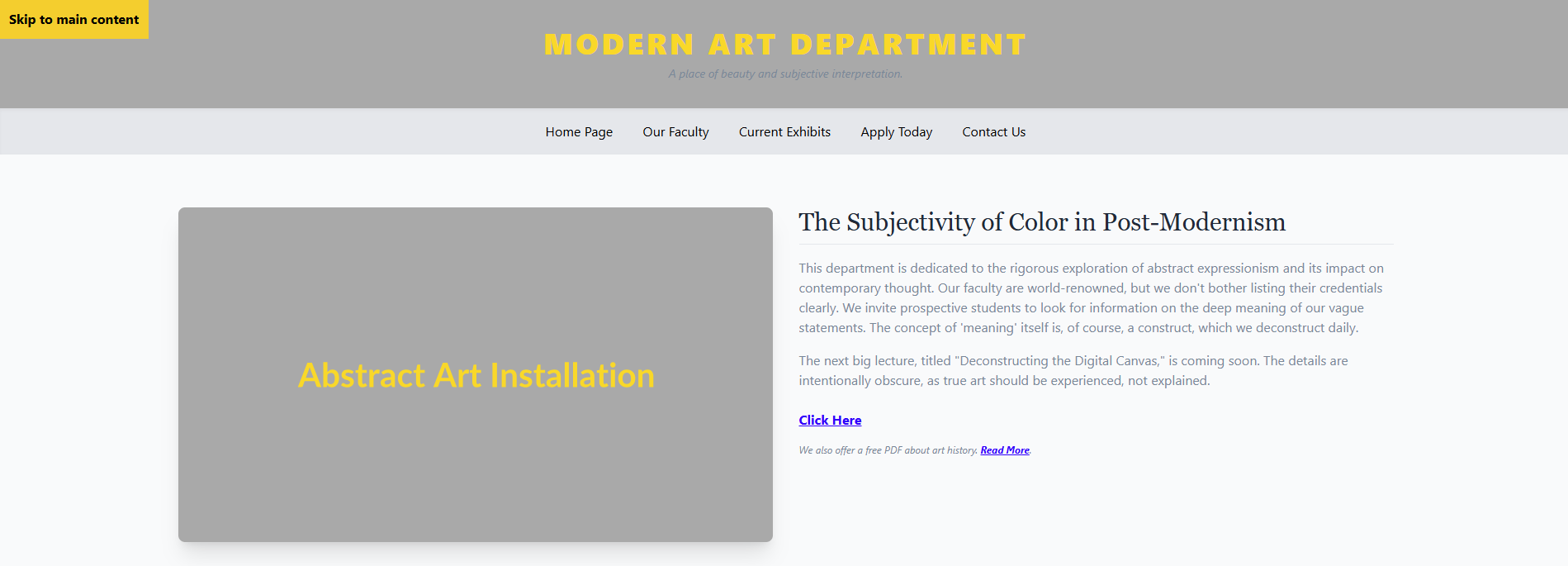
I was given a website code that was not accessible. In the role of an ADA Accessibility Coordinator, I would start by checking the code for accessibility issues and reviewing the webpage to see how easy it is for people to use. I'd also look for ways to apply Universal Design so people have more options in how they get the information. I would fix small mistakes myself. For bigger projects, like auditing an entire website, I would assign each major issue to the right person. Then I would create a simple project plan with clear steps and deadlines and guide the process using the ADDIE model.

For long-term success, I would look at the audit results to see what problems keep happening. Then I would create easy-to-follow training, using proven teaching methods, to help people avoid those mistakes in the future.

Open my design process page to see how I use Merrill's First Principles to design task-centered learning solutions.

Remediation schedule using ADDIE:

Week 1 – Analysis & Design (AD)
  • Audit the website and make a list of accessibility issues
    • Owner: Michael
    • Depends on: —
    • Due: Day 2
  • Design a remediation plan and build a coalition
    • Owner: Michael
    • Depends on: Audit issues identified
    • Due: Day 3
  • Develop a shared vision for revised product
    • Owner: Michael + Coalition
    • Depends on: Plan drafted
    • Due: Day 5
Week 2 – Development (D)
  • List issues from audit by dependencies
    • Owner: Michael
    • Depends on: Audit + plan finalized
    • Due: Day 8
  • Fix small, low-dependency issues (alt text, titles, headings, contrast)
    • Owner: Developer A
    • Depends on: Issue list complete
    • Due: Day 9
  • Prototype fixes for navigation and form accessibility
    • Owner: Developer B
    • Depends on: Issue list complete
    • Due: Day 10
Week 3 – Implementation & Evaluation (IE)
  • Push remediated code to staging
    • Owner: Developer A
    • Depends on: Development fixes complete
    • Due: Day 13
  • Run automated accessibility tests (axe, WAVE)
    • Owner: QA Lead
    • Depends on: Code pushed to staging
    • Due: Day 14
  • Conduct manual screen reader + keyboard testing
    • Owner: Ann Marie + Michael
    • Depends on: Automated tests complete
    • Due: Day 15
  • Push final updates live
    • Owner: Developer A
    • Depends on: QA approval
    • Due: Day 16
  • Review recurring issues and identify training needs
    • Owner: Michael
    • Depends on: QA findings
    • Due: Day 18
  • Close project and document outcomes
    • Owner: Michael
    • Depends on: Evaluation complete
    • Due: Day 19

Remediation plan:

Accessibility Remediation Plan
Issue # Short description WCAG Owner Depends on
1 Page title is vague 2.4.2 Michael None
2 Missing main heading (H1) 1.3.1 Dev None
3 Header text fails contrast 1.4.3 Design 2
4 Body copy is low contrast 1.4.3 Design None
5 Focus indicators removed 2.4.7 Dev None
6 Skip link implementation 2.4.1 Dev 5
7 Non-semantic navigation 1.3.1; 2.1.1 Dev 2
8 Vague image alt text 1.1.1 Content None
9 Heading hierarchy skipped 1.3.1 Content 2
10 Vague link text 2.4.4 Content None
11 Non-semantic table 1.3.1 Dev None
12 Link used as submit button 2.1.1; 4.1.2 Dev 11
13 Footer text too small/low contrast 1.4.3; 1.4.4 Design 4
14 Form accessibility (labels, color, focus) 3.3.2; 1.4.1; 2.1.1; 4.1.2 Dev 5

Learning Plan

I would look at the audit results to see what problems keep happening. Then I would create easy-to-follow training, using proven teaching methods, to help people avoid those mistakes in the future.

Open my design process page

to learn more about how I create training solutions to solve performance problems.

Let's work together!

Need your team to master a new skill or sharpen an existing one? Let's identify what they need and design a solution that will guide them to new heights.
Thank you! Your submission has been received!
Oops! Something went wrong while submitting the form.